
BLOG
How to take front and side posture photos, using setups from published studies
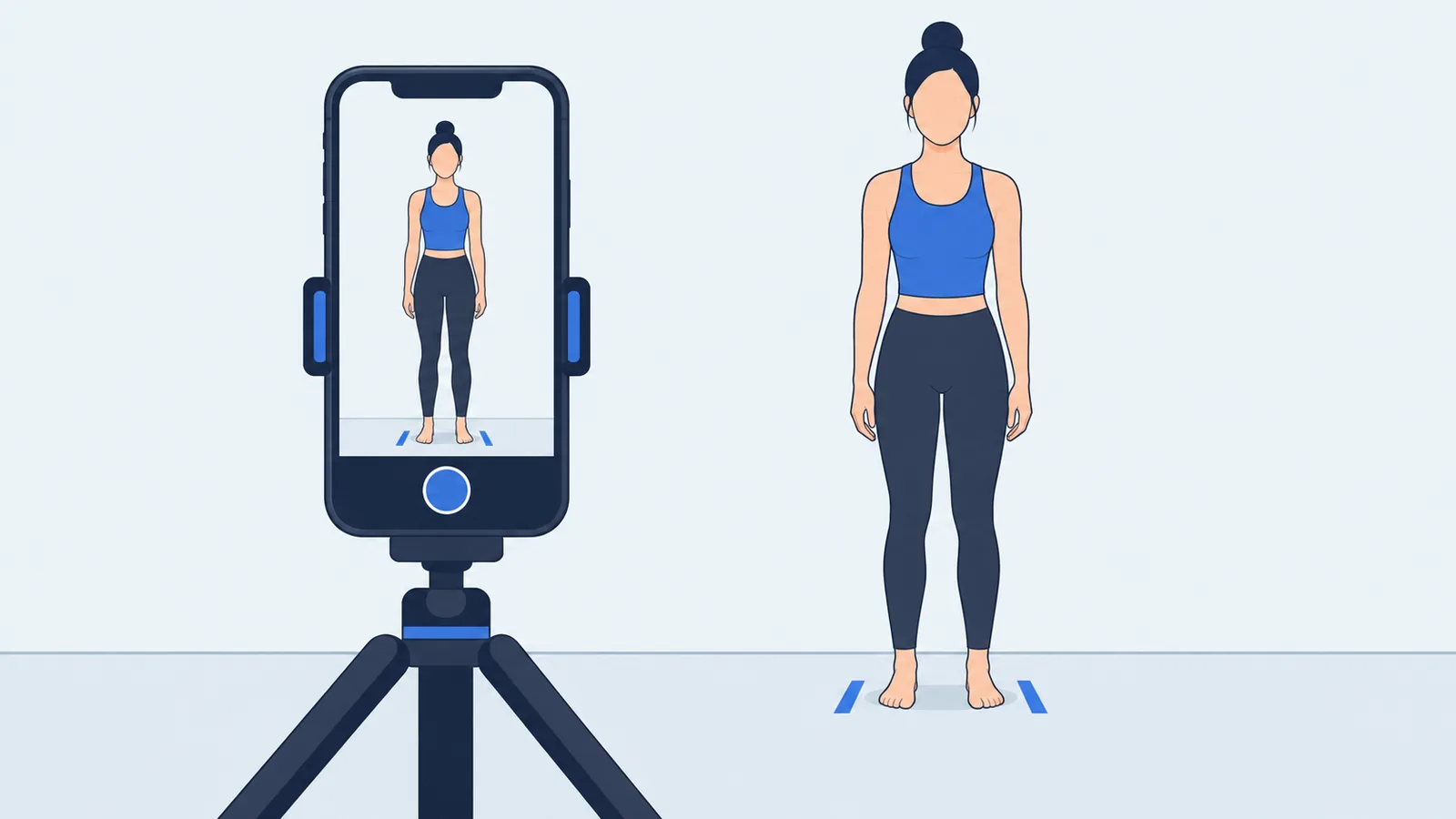
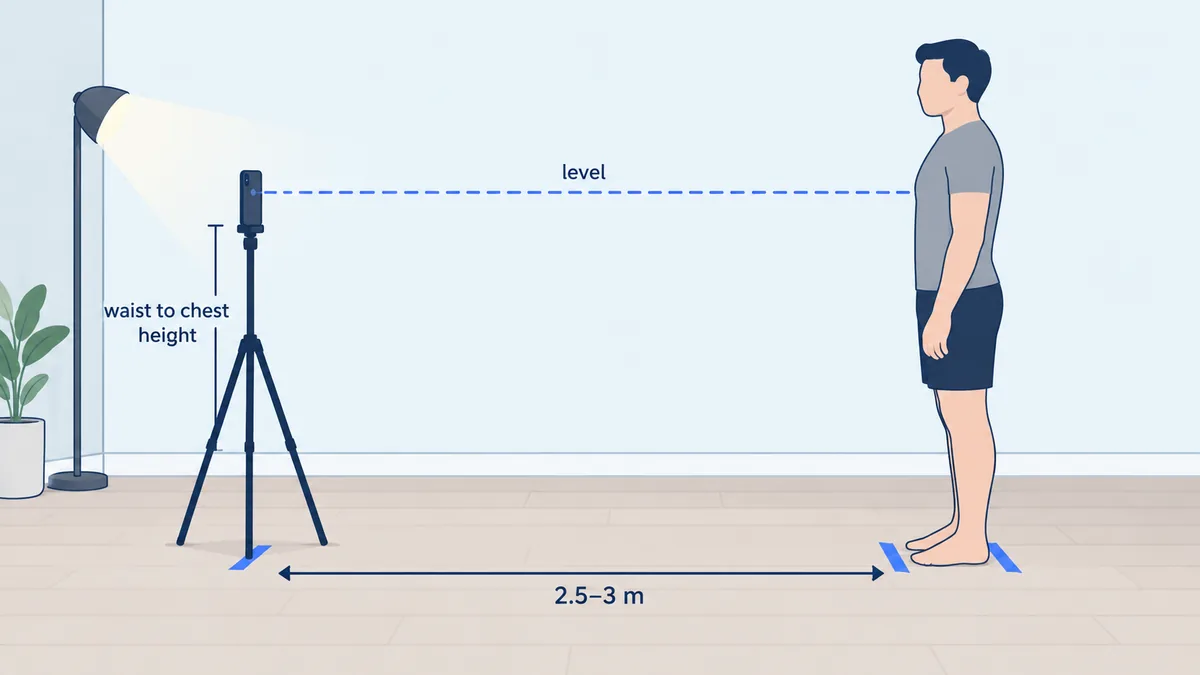
To take posture photos you can measure, prop your phone upright and level at waist to chest height, about 2.5 to 3 metres away, and take one front and one side photo of your whole body against a plain, well-lit wall, in fitted clothing, standing the way you usually stand. You need the phone, something to prop it on, tape and about 20 minutes the first time. Each step below follows published posture studies.
Use the same setup every time so that later photos can be compared with earlier ones. Photos are one of three ways to look at your posture at home; how to check your posture at home compares them with a wall check and a posture app.
1. Stand 2.5 to 3 metres from the camera
Published setups put the camera between about 1.9 and 3 metres from the person. In the validation study of the SAPO posture software (Ferreira and colleagues, 2010, 22 adults), the cameras were 1.9 m and 2.52 m away, zoomed to leave about 0.5 m of free space above and below the body. A 2016 study of the PostureScreen app with 10 adults (Boland and colleagues) placed the tablet 10 feet (3.05 m) away, a 2018 PostureScreen study of 20 young adults (Szucs and Donoso Brown) used 8 feet (2.44 m), and a 2024 study of 98 young adults (Titcomb and colleagues) used 3 m. For a phone at home, we suggest the upper part of that range, 2.5 to 3 m.
Distance also keeps your body away from the distorted edges of the image. A reliability study from Malaysia with 24 men put its camera 7 metres away so that a 1.8 m tall person fitted inside the part of the image with little lens distortion. You do not need 7 metres at home, but do not stand so close that your body fills the frame edge to edge, and do not switch to the ultra-wide (0.5x) lens to fit yourself in, because wide lenses stretch shapes near the edges.
2. Keep the phone level, square to you, at a repeatable height
A phone tilted down from a table or up from the floor changes the angles between body landmarks in the photo. The Titcomb study levelled its camera with spirit levels, the SAPO study set its cameras perpendicular to the body, and posture apps such as APECS and PostureScreen show an on-screen target that turns green when the device is level.
Camera height varies between studies: 4.5 feet (1.4 m) in the Boland study, and level with the base of the neck in the Titcomb study, which photographed only the head and neck. The Malaysian study compared a camera 70 cm and 100 cm from the floor and found that the height did not significantly change its measurements, so in our reading a level camera matters more than the exact height. For a full-body phone photo, roughly waist to chest height centres your body in the frame. Pick one height and reuse it.
At home, prop the phone upright against books on a shelf or chair, or use a small tripod with a phone clamp. Turn on the grid in your camera settings, and the level indicator if your camera app has one.
3. Use a plain background and even light
Posture apps place landmarks on your outline, so your body should stand out clearly from everything behind it. Stand a short step in front of a plain wall in a colour that contrasts with your clothes, and keep furniture, mirrors and other people out of the frame. Let light fall on you from the front or slightly to the side: a bright window behind you turns your body into a silhouette, and a single side lamp throws shadows that hide joints.
4. Wear fitted clothing and keep landmarks visible
Fitted clothing makes joints easier to locate. In the Boland study, examiners placing points by hand agreed on more measurements, most clearly shoulder tilt, when the 10 participants wore minimal clothing than when they wore street clothes, and the authors recommend minimal clothing for postural screening. The Szucs study used form-fitting shorts and tops.
- Wear fitted shorts or leggings and a fitted T-shirt or sports top. Avoid hoodies, loose trousers, long skirts and jackets.
- Tie long hair back so your ear and neck show from the side. The craniovertebral angle used in neck posture studies is measured from the ear.
- Go barefoot, or wear the same flat shoes every time. The Boland study removed shoes.
You do not need stickers on your body. In research, small markers on bony points help examiners place points by hand; an app that detects landmarks automatically, such as PoseAlign, relies on what the photo shows, so fitted clothing and good light matter more.
5. Stand the way you usually stand
The goal is your everyday posture, and trying to stand "well" changes the result. In a 2021 study of 66 physical therapists and physical therapy students photographed over a video call (Cote and colleagues), the average craniovertebral angle (the angle between the horizontal and a line from the ear to the base of the neck) was 50.7° in their relaxed posture and 55.5° when they were asked to take their best posture. The instruction alone shifted the average by about five degrees.
Studies use a short routine to help people settle into a natural stance. You can copy it:
- March on the spot for five steps (the Titcomb study), then stop with your feet hip-width apart.
- Settle with your weight comfortably on both feet. Skip marching or head movements if they are uncomfortable or unsteady.
- Nod your head slowly down and up three times (the Titcomb study), then look straight ahead at a mark on the wall at eye level (the Boland study).
- Breathe out, let your arms hang relaxed and hold still for about five seconds while the photo is taken.
Mark where your feet go. A 2024 study of 150 adults aged 18 to 30 (Daffin and colleagues) found that people did not reliably reproduce a self-chosen foot position across three days, and the authors suggest tracing it so it can be repeated. Two strips of tape on the floor do the job.
6. Take the front photo
Face the camera squarely with your weight even on both feet. Your nose, the middle of your chest and the point between your feet should line up with the centre of the photo. Keep your head, both hands and both feet fully visible, with some empty space above your head and below your feet.
7. Take the side photo as a true profile
Turn 90 degrees so the camera sees your side, and check that you have not twisted back toward it. In a true profile, your near shoulder hides most of the far shoulder and your feet point across the frame. A body turned partly toward the camera mixes the front and side views, so side-view angles are then taken from a rotated body. Use the same side every time; the Titcomb study always photographed each participant's dominant side.
8. Use a timer and check the photo before you move
Use the 3 or 10 second self-timer, or ask someone to tap the shutter without moving the phone. Mirror selfies do not work for posture: the phone is held at an angle, the raised arm lifts one shoulder and the image is flipped.
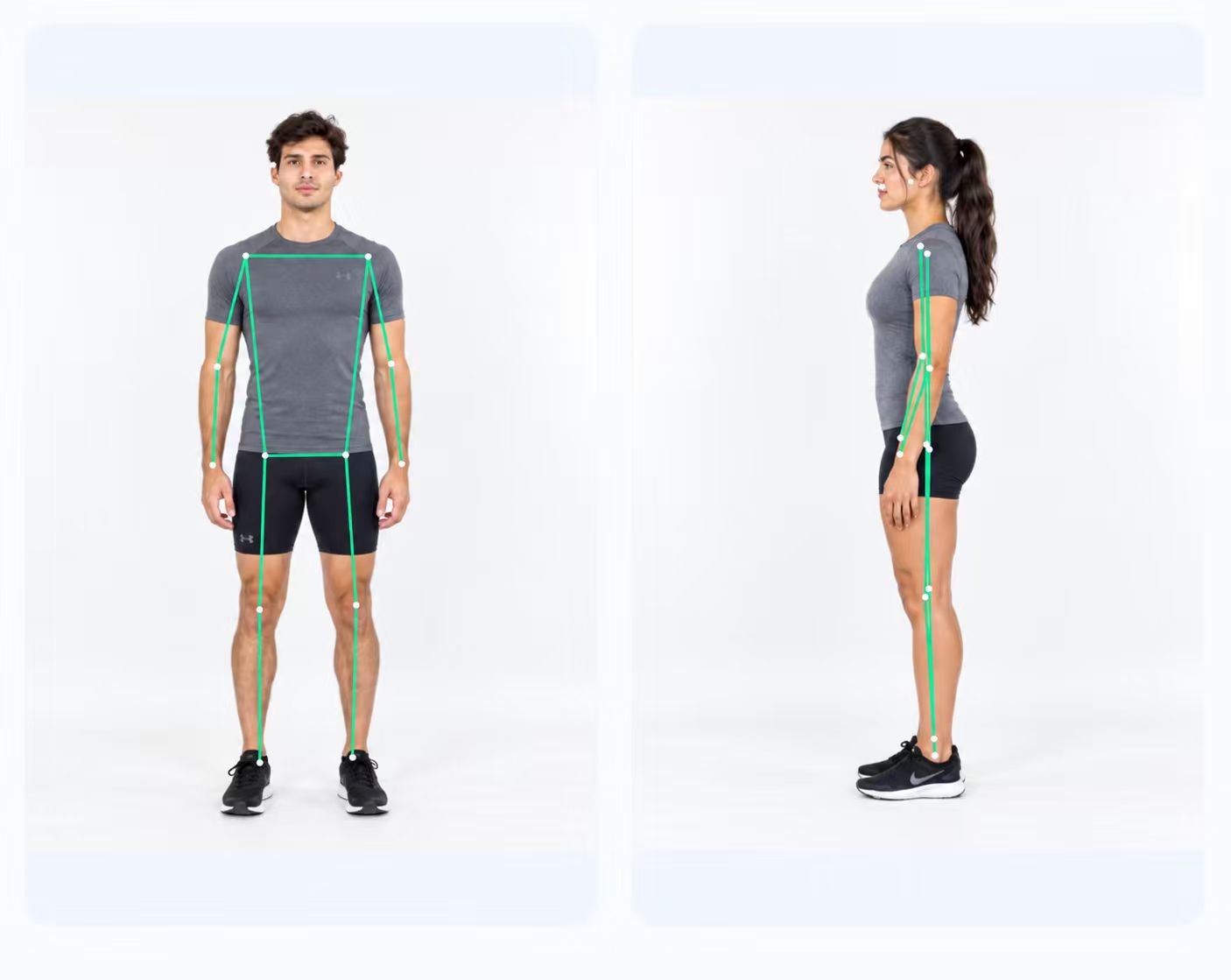
Before you step away, zoom in on the photo. Check that it is sharp, that your head and feet are not cropped, and that your ear, shoulder, hip, knee and ankle are visible in the side photo. Take two photos of each view and keep the clearer one.
9. Reuse the setup for later checks
Photos taken months apart are only comparable when they are taken the same way. Note the phone's spot, its height and the distance, keep the same lens, clothing and footwear, and take the photos at a similar time of day. Our routine for tracking posture changes covers what to record and how to compare reports.
What front and side photos leave out
Two photos cover the front and one side of your body, and nothing else. Clinics and research protocols often take more. The SAPO study photographed each participant from the front, the back and both sides, and its markers included the lower tip of each shoulder blade and a point on the upper spine, from which it measured whether the shoulder blades sit evenly either side of the spine. Those points are only visible from behind. A posture coach's photo instructions for clients ask for four photos: front, back and both sides. The American College of Sports Medicine's introductory guide to static posture (2023) works from the front and side and uses a back view to confirm what the front view suggests, especially at the feet and ankles.
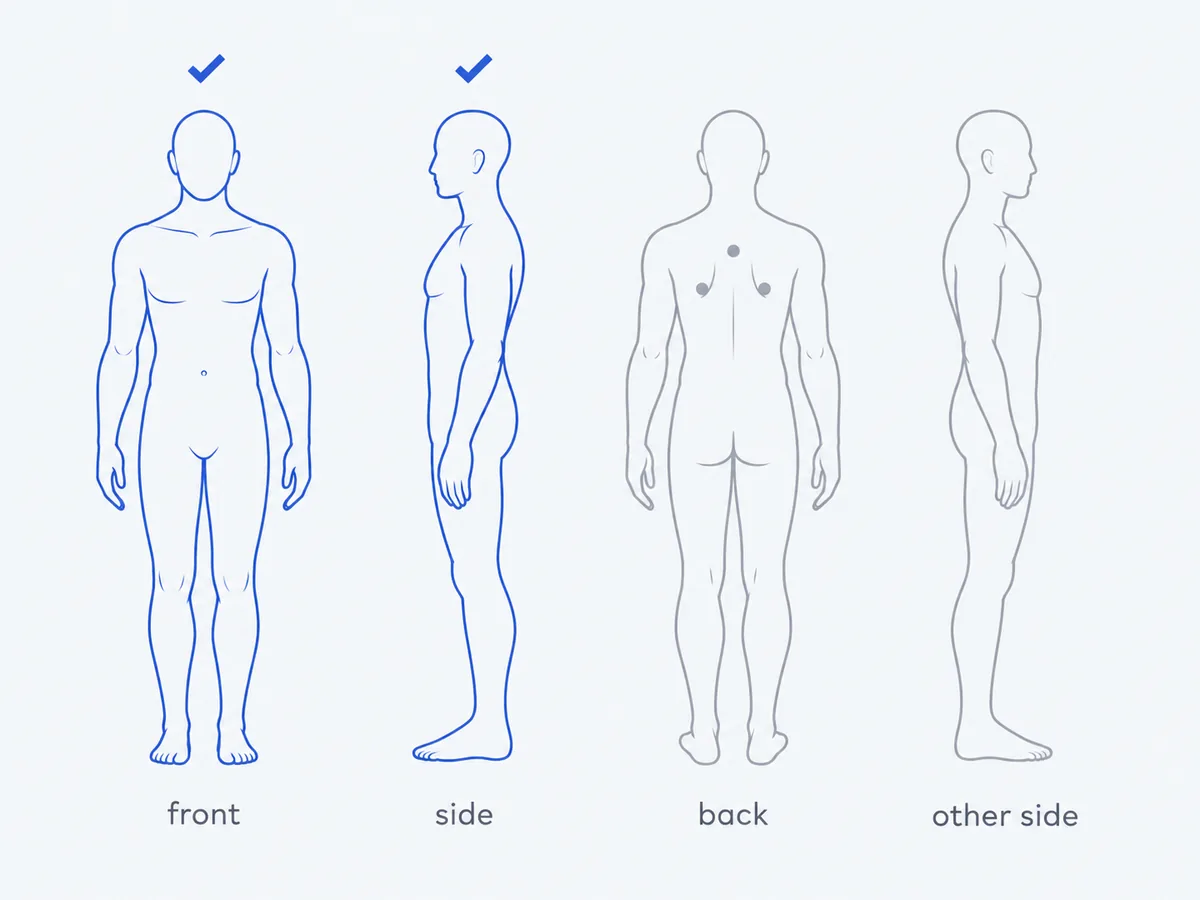
PoseAlign uses one front and one side photo, so it does not look at your shoulder blades, your spine from behind or the other side of your body. If a physio or trainer asks for a back view, take it with the same setup, facing away from the camera, and take the second side photo by turning to face the other way.
Common mistakes and how to fix them
| Mistake | What it does | Fix |
|---|---|---|
| Phone tilted on a low table or held in the hand | Changes angles between landmarks | Prop the phone upright and use the grid or level |
| Standing too close, or using the 0.5x lens | Stretches the body near the frame edges | Step back to 2.5 to 3 m and use the main lens |
| Baggy clothes, hair over the ear | Landmarks have to be guessed | Fitted clothing, hair tied back |
| Standing extra tall for the photo | Records your best posture, not your usual one | March in place, breathe out, relax |
| Side photo turned slightly toward the camera | Mixes front and side views | Turn a full 90 degrees |
Measure your photos
PoseAlign is a free posture analysis app for Android, with no subscription and no in-app purchases. Add the front and side photos to their slots under Advanced check and tap Generate report; the step-by-step app walkthrough shows each screen.
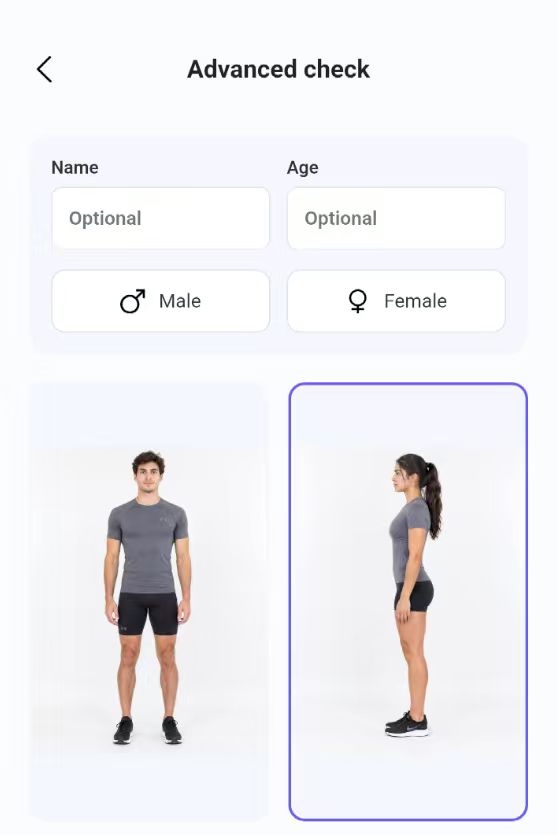
Look at the landmark overlay before you read any numbers. If a point sits off your joint because of a shadow or loose clothing, retake that photo. The report then lists 11 front-view and 2 side-view measurements, which are estimates from photos and do not diagnose any condition. Our guide on how to read a posture analysis report explains the units, and how accurate photo-based posture analysis is covers what the research says about relying on them.